


Optimum warehouse efficiency is a competitive edge in the current supply chains that are fast-moving. MetaWMS introduces a new aspect to Microsoft Dynamics 365 Business Central by transforming the ERP into a complete warehouse management solution. The combination assists businesses to minimize errors, accelerate fulfillment and offer real-time inventory visibility in various locations. This article describes the way that MetaWMS connects with Business Central, the core capabilities that it provides, real-world examples, an implementation plan, and quantifiable results that you can anticipate when you bridge operational execution to enterprise systems.
Why Warehouses Need More Than Basic ERP Functionality
In an ERP, many companies begin with basic inventory and order modules. These modules are used to process basic transactions, but they do not usually have advanced tools to perform complicated tasks in the warehouse. The constraints become apparent as volume, SKU complexity, and multi-location requirements increase. Picking errors, ineffective put-away plans, and ineffective location control are typical areas of pain. An extension to a dedicated warehouse management is a viable solution.
MetaWMS is that extension. Developed to be used with Dynamics 365 Business Central, it focuses on warehouse operations: bin control, license plating, barcode reading, cycle counting, and efficient picking. The integration of operational intelligence over transactional ERP data enables MetaWMS to transform the daily activities of the warehouse into a structured and error-free process that can be followed by the staff, even during the pressure.
Know More: External vs. Integrated WMS: Decoding the Best Fit for Business Central Users
Core Capabilities of MetaWMS
MetaWMS introduces a number of features that are relied on by warehouse teams. These capabilities are meant to seal loopholes present in the core ERP warehousing and to integrate with the existing financial and inventory ledgers within Business Central.
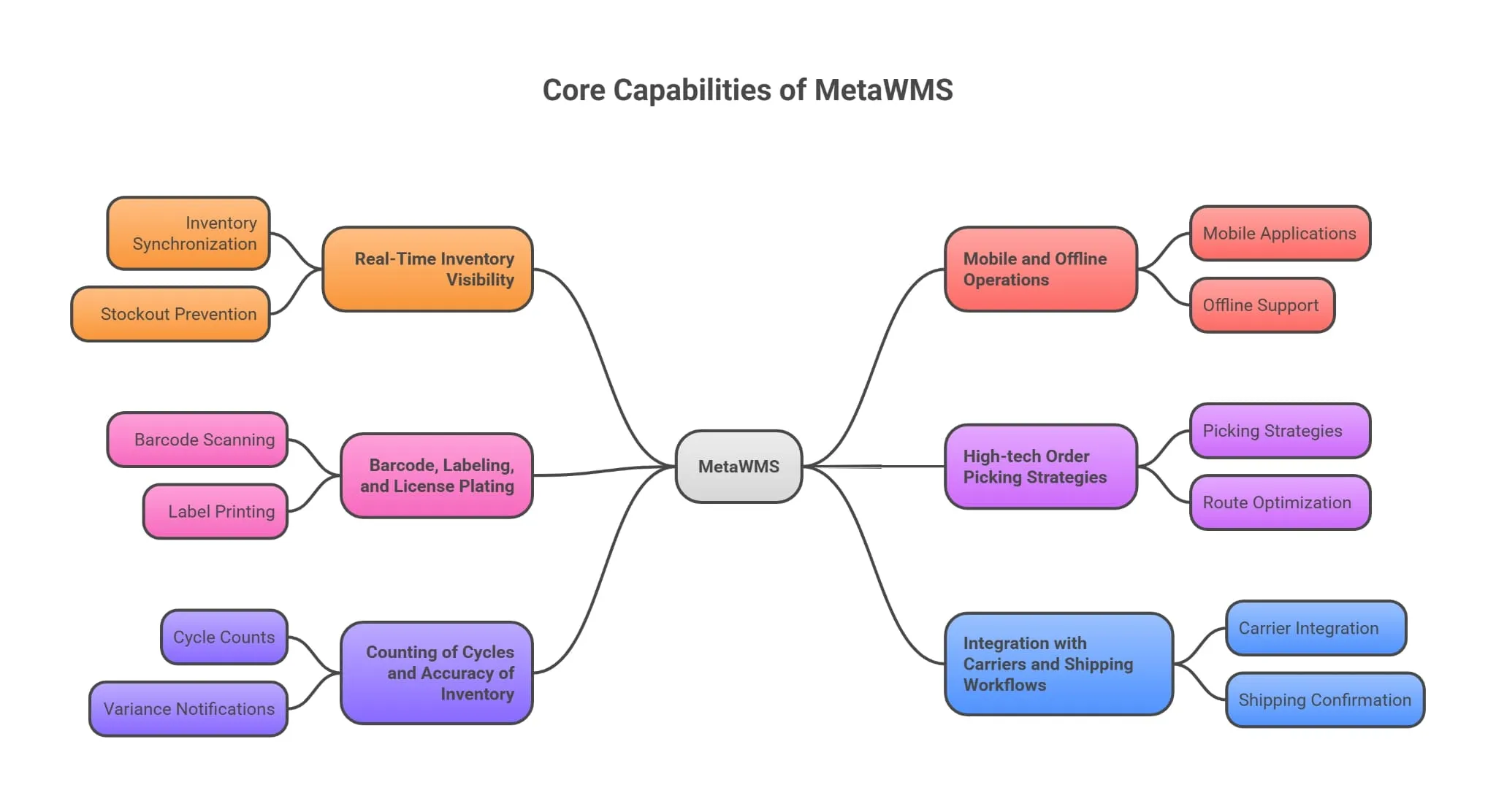
1. Real-Time Inventory Visibility
MetaWMS synchronizes inventory in real time when goods are received, moved or shipped. This gets rid of the difference between the physical and system records of stock and this minimizes stockouts and overstock. Managers are able to see inventory by bin, lot, serial number, and expiry to make sure it is allocated correctly and replenished in time.
2. Mobile and Offline Operations
Floors of the warehouse are dynamic and continuous operations are necessary. MetaWMS has mobile applications with offline support of barcode scanning, picking, and put-away. Employees are able to scan and process even when there is a lack of connectivity; the information will automatically synchronize as soon as the device is connected again.
3. Barcode, Labeling, and License Plating
MetaWMS is compatible with 1D and 2D barcode scanning, custom label printing, and license plate tracking to identify pallets. These functions assist in minimizing mistakes in manual entries and accelerating receiving, picking and shipping.
4. High-tech Order Picking Strategies.
MetaWMS allows various picking strategies: single-order, wave picking, zone picking and multi-order batching. The system is able to propose the best pick routes and batch orders in order to reduce the travel time and labor expenses. Algorithms give priority to picks according to the urgency of orders, shipping dates and carrier schedules.
5. Counting of Cycles and Accuracy of Inventory.
Planned cycle counts and perpetual inventory processes ensure continuous accuracy of inventory. MetaWMS allows counting by employees using personal count lists, automatic variance notifications, and simple reconciliation to the ERP.
6. Integration with Carriers and Shipping Workflows
Shipping is a very sensitive customer touchpoint. MetaWMS is connected to shipping carriers and supplements larger shipping platforms to simplify the label creation, carrier selection, and tracking. This integration minimizes manual handoffs and re-integrates shipping confirmations into Business Central.
Learn more: How to Choose a Warehouse Management System That Works Seamlessly with Business Central
How Integration with Business Central Works
MetaWMS is designed to match the data model of Business Central. The idea is to utilize the strengths of the ERP, which are financial controls, accuracy of posting, and master data, and supplement operational warehouse processes. The integration is done by using standard extension points and APIs that make sure that transactions in the warehouse are instantly updated in the inventory and financial ledgers of the ERP.
Data synchronization is concerned with speed and reliability: receipts, put-aways, transfers, picks and shipments are updated in near real-time. This close integration removes the headaches of reconciliation and makes sure that the reports generated in Business Central are up to date on the operations. Items, units of measure, customer/supplier records are master data that are authoritative in the ERP, whereas MetaWMS coordinates the physical movements and operational logic.
Business Benefits in Practical Terms
The short-term gains are operational: reduced pick error, reduced order cycle times, and reduced labor costs. But the worth goes further than the warehouse. Correct inventory location enhances buying choices, minimizes inventory, and eradicates expedited deliveries that diminish margins. Customer service is enhanced through guaranteed delivery and real time tracking.
In addition, MetaWMS assists companies to meet regulatory and traceability requirements by capturing lot and serial movements with accuracy. This traceability is crucial in the case of industries such as pharmaceuticals or food and beverage. Financial benefits are also the result of operational gains: fewer write-offs, lower carrying costs, and improved calculation of cost-of-goods-sold.
Use Cases and Industry Examples
1. Distribution Centers
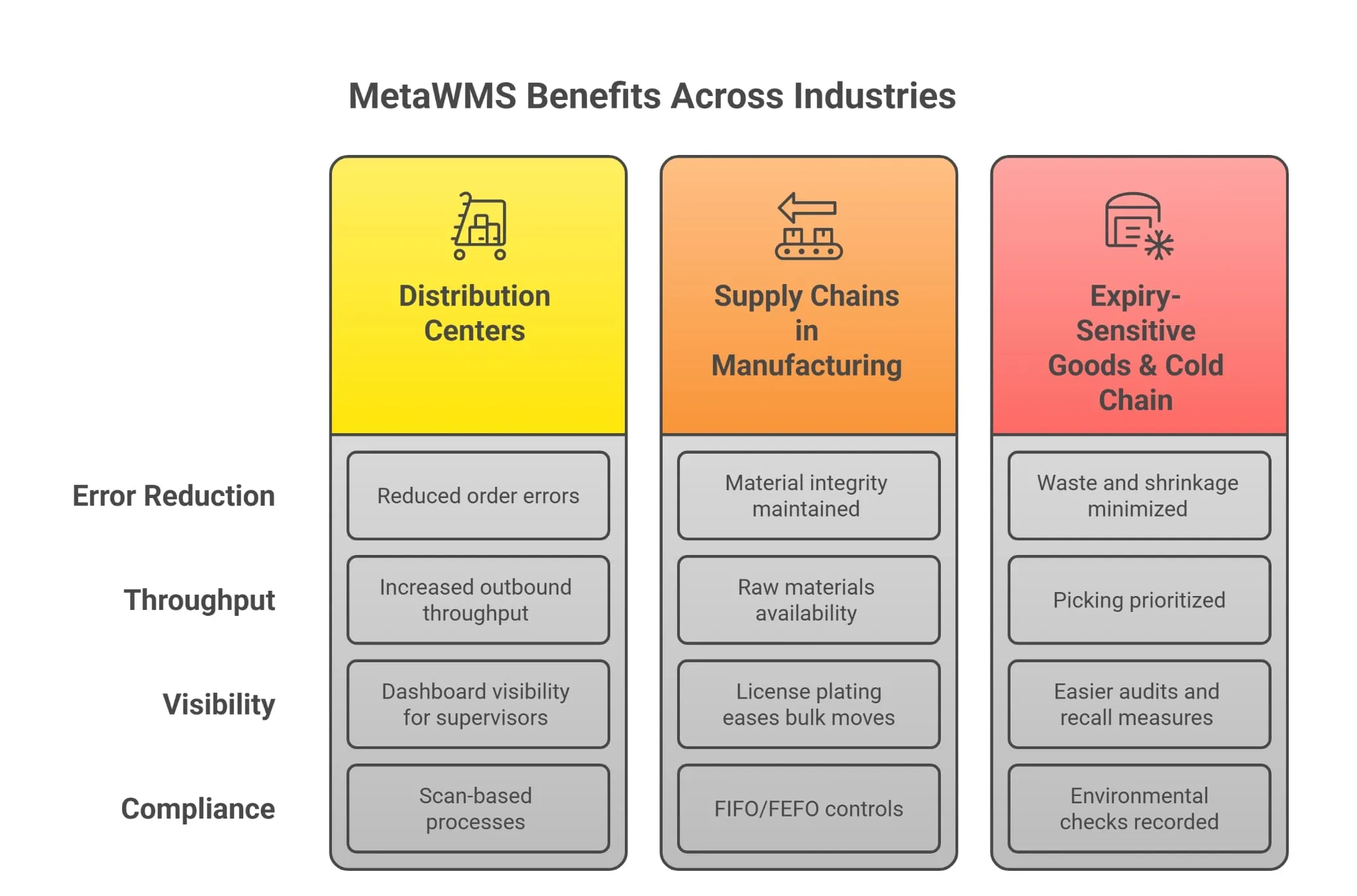
A mid-size distributor typically has thousands of SKUs and shipments of carriers per day. The adoption of MetaWMS enabled their employees to leave paper-based picking and switch to scan-based processes. The number of order errors was reduced drastically and outbound throughput increased through optimization of pick routing and improved packing verification. Warehouse supervisors also received dashboard visibility that facilitated the shift handovers and minimized the time wasted in miscommunication.
2. Supply Chains in Manufacturing
The advantage of the manufacturers is that they can connect the demand of production with the availability of warehouses. MetaWMS guarantees that raw materials and components are present at the appropriate place and quantity to be used in production runs. The lot tracking and FIFO/FEFO controls of the system maintain material integrity and compliance, and the license plating eases bulk moves and staging to production lines.
3. Expiry-Sensitive Goods and Cold Chain
MetaWMS implements expiry-dating and FEFO operations in case of businesses that handle perishable inventory. Near-expiry lot alerts make picking prioritized, minimizing waste and shrinkage. Environmental checks or temperature can be recorded and linked to inventory movements, which makes audits and recall measures easier.
Advanced Operational Features
MetaWMS has more sophisticated features that are not limited to receiving and picking. Slotting optimization examines item size, pick frequency and seasonality to suggest optimal bin positions, which minimizes picker travel and maximizes throughput. Wave and batch planning allows managers to cluster orders based on carrier, priority, or packing constraints, trading off speed and accuracy. The workflows of returns processing automate inspection, quarantine, and disposition, and make sure that returned goods are processed fast and financial implications are recorded correctly.
Labor management tools assist the supervisors in establishing work assignments, monitoring productivity and predicting staffing requirements. Labor modules can minimize overtime and match the staffing to demand peaks when used with incentives or performance visibility. Kitting and assembly steps are also supported by the system to businesses that complete made-to-order or configured products, and components are reserved and issued appropriately.
Data and Analytics: Turning Operational Data into Decisions
A WMS creates valuable operational data. MetaWMS supplies dashboards with pick accuracy, slot utilization, exception rates, inbound throughput, and labor efficiency. When these dashboards are integrated with Business Central financials, managers are able to correlate the performance of the warehouse to the cost of goods sold and fulfillment margins. Patterns of the past indicate seasonal demand patterns and assist planners to establish dynamic reorder points and safety stock levels.
Continuous improvement programs are also made possible by analytics. Teams can design specific countermeasures by monitoring root causes of exceptions, such as mis-shipments, inventory adjustments, or damaged goods. Early interventions and prevent bigger disruptions are triggered by predictive indicators, including increasing exception rates or slowed inbound processing.
Security, Auditing, and Compliance
MetaWMS is role-based, audit-logged, and transaction-traceable. In the case of regulated industries, it captures lot movements, serial history, and environmental checks and compliance reporting is part of daily operations. These characteristics minimize the audit work and generate documentation trails that are needed by regulators.
Integrations are safe because of user authentication and secure APIs. The system records the identity of the person who did something, when, and on which device- details that make investigations easier and hold people accountable. In the case of businesses that cross borders, configuration and policy enforcement can be used to honor data residency and export regulations.
Scalability and Multi-Site Coordination
Expanding companies usually include warehouses or regional centers. MetaWMS is a multi-site operation that is centrally configured and locally executed. The headquarters are able to publish master data and policies and each location is able to run with region-specific parameters like carrier preferences and language settings. This balance eases the expansion and maintains operational independence where necessary.
Also, inter-site transfers, cross-dock operations and hub-and-spoke models are facilitated by integrated transfer orders and real-time status updates. Planners are able to see inventory in the network and make allocation decisions that minimize lead times and stock imbalances.
Implementation Roadmap
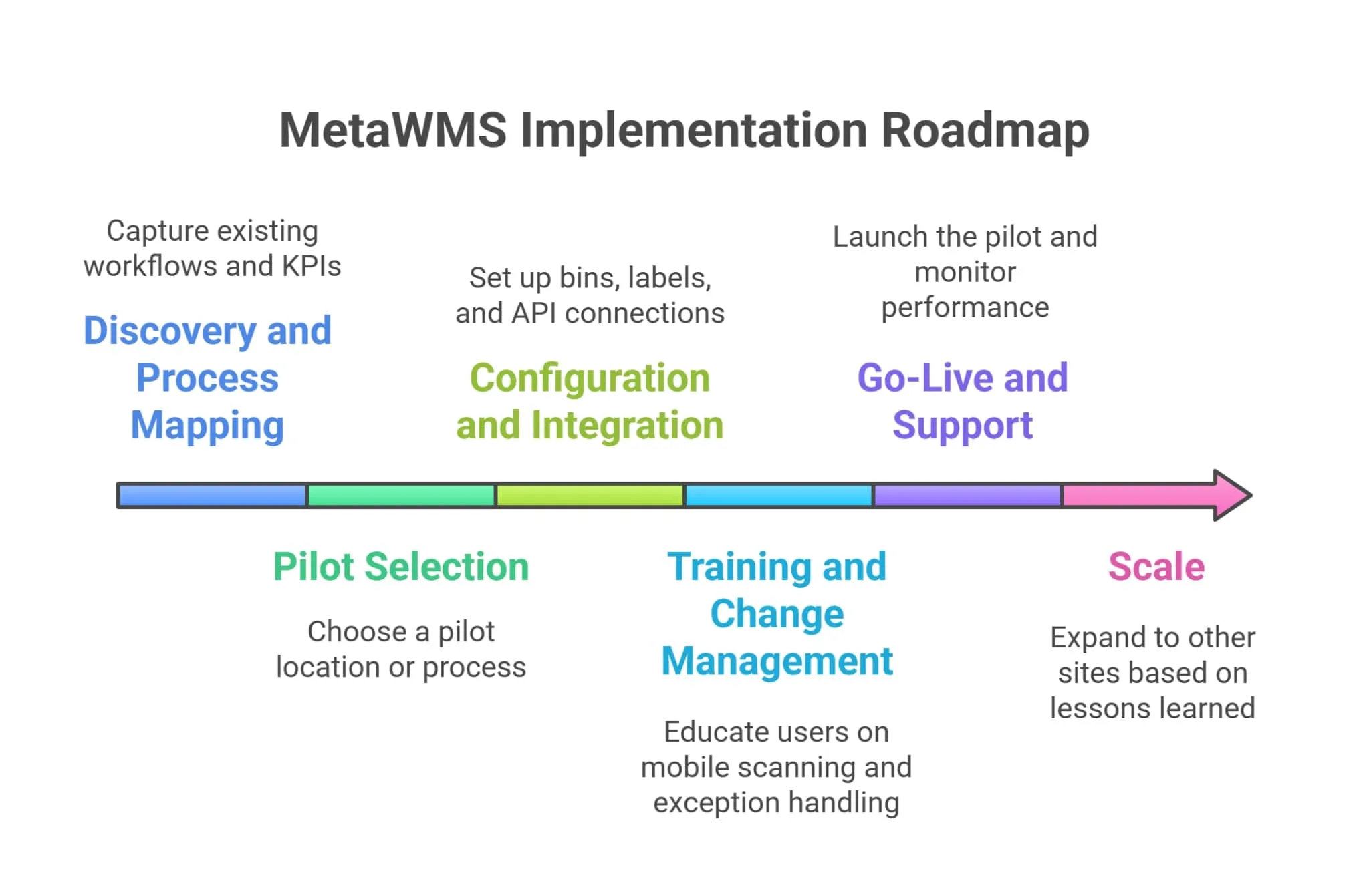
An effective rollout starts with objectives and a gradual execution. The following is a suggested roadmap when deploying MetaWMS with Business Central.
- Discovery and Process Mapping: Capture existing workflows, pain points, and KPIs in the warehouse. Find fast wins and key exceptions.
- Pilot Selection: Select a pilot location or process like receiving or picking, preferably where measurable impact is likely to occur.
- Configuration and Integration: Map master data and set up bins, labels, picking rules and device profiles. Create API connections and posting rules to Business Central.
- Training and Change Management: Educate mobile scanning, label printing, and exception handling to train users. Apply practical practice and role documentation.
- Go-Live and Support: Launch the pilot, perform monitoring, and quickly iterate on configuration to fix operational gaps.
- Scale: Expand to other sites based on lessons learned, standardized templates, and repeatable playbook.
The timelines of implementation are based on complexity. A small location with barcode-based receiving and picking can be operational in weeks; enterprise deployments with automation and complicated slotting might require months. Clean master data and clear pilot objectives reduce time to value.
Measuring Success
Evaluate performance with important measures: pick accuracy, order cycle time, inventory accuracy, labor units per order, and on-time shipment percentage. Baseline numbers should be set prior to implementation and measured at regular intervals to measure ROI.
An empirical estimate indicates direct savings of labor cuts and reduced shipping mistakes. As the accuracy of inventory is enhanced, purchasing teams are able to lower safety stock and free working capital. The warehouse KPIs should be linked to financial results by the leadership like minimized expedited freight and enhanced margin per order.
Common Pitfalls to Avoid
Do not over-customize the solution; use the standard processes initially. Only where competitive or regulatory requirements require it, customize. Training is not to be overlooked–user adoption is the biggest success factor. Make sure that the network is reliable on the warehouse floor and confirm label/scan workflows. Lastly, anticipate any exceptions such as returns, damaged products and inventory corrections in order to have the system gracefully handle them.
The Strategic Edge: Connecting Warehouse Operations to Business Outcomes
Combining MetaWMS and Dynamics 365 Business Central, organizations synchronize operational performance and financial performance. Accuracy in inventory minimizes the working capital requirements; quick fulfillment maximizes revenue by enhancing customer retention. The system allows the use of data to make procurement decisions, forecasting more accurately, and a direct connection between warehouse KPIs and profit-and-loss statements.
MetaWMS does not exist in a vacuum; it is a component of a larger logistics and supply chain ecosystem. It may be used in addition to TMS (transportation management), helpdesk systems, and marketplace platforms. In the case of businesses that require shipping orchestration and carrier management, a modern shipping management solution may be integrated with MetaWMS to centralize carrier rules, trackability, and freight cost management.
Why Choose MetaWMS for Your Business
MetaWMS is an integration-oriented design. It honors ERP master data, follows standard posting practices and maintains lean and auditable warehouse operations. Vendors who develop their WMS as extensions of Business Central minimize the threat of data duplication and reconciliation work. MetaWMS is aimed at process efficiency, mobile tools that are easy to use, and real-time synchronization. This minimizes the operational friction that tends to hamper the scaling of profitability of warehouses.
Implementation Considerations and Typical Timelines
The implementation schedules are dependent on scope. A pilot that specializes in mobile scanning, receiving and simple picking can be live in a matter of weeks, but rollouts with advanced slotting, automation integration or large scale master data cleansing can take several months. Barcode and label strategy, device selection, floor network reliability, and defining exception workflows are critical planning items. Pilot testing minimizes risk and assists in calibration of configuration to wider deployment.
Measuring ROI with a Practical Example
Take the case of a distributor that handles 150,000 orders annually and has four picks per order on average. Assuming that every pick costs 0.80 in labor and that the MetaWMS saves 15 percent of the labor per pick by cutting pick time and travel, the savings are enormous on an annual basis. Divide and conquer: 150,000 orders 4 picks $0.80 15% = 72,000 in direct labor savings a year. The cumulative ROI multiplies rapidly when coupled with a lower number of shipping errors and less expedited freight.
Support, Upgrades, and Extensibility
MetaWMS being built on Business Central, it is compatible with ERP upgrade paths and reduces the amount of reconciliation needed when updating to a new version. Vendors offer lifecycle support, such as patches, carrier connector updates, and pre-tested integrations with common automation hardware. Extensible APIs enable links to conveyors, warehouse automation, and external execution systems.
Frequently Asked Questions
Q1: Can MetaWMS work with existing barcode hardware?
A: Yes. MetaWMS supports a wide range of scanners and mobile devices; assessing existing hardware compatibility is part of the planning phase.
Q2: Does MetaWMS require changes to financial processes in Business Central?
A: Minimal changes are needed. The integration posts warehouse transactions in accordance with Business Central’s posting rules to maintain financial integrity.
Q3: How long before we see benefits?
A: Many customers report measurable improvements—faster picks, fewer errors—within weeks of the pilot. Broader efficiency gains accumulate as processes are refined.
Conclusion and Next Steps
MetaWMS transforms the complexity of the warehouse into repeatability and aligns with the enterprise systems. With the selection of a WMS that is designed to integrate with Dynamics 365, organizations minimize reconciliation, boost throughput, and enhance traceability. In case inventory variances or fulfillment expenses are influencing performance, consider a pilot that is targeted at the most impactful process. The adoption of MetaWMS and a wider business central 365 strategy can allow integration of finance, sales, and operations and matching of MetaWMS with a shipping capability where necessary.
Begin with mapping existing flows in the warehouse, find a pilot opportunity, and create a small cross-functional team to spearhead the rollout. A WMS can transform your warehouse into a strategic asset that can be used to grow and keep customers happy with the right plan and skilled implementers. Regularly measure results and repeat processes to maintain long-term continuous improvement and operational excellence.
