



When a business starts to expand beyond the capacity of its ERP (Enterprise Resource Planning) system, a critical question must be answered: is it better to customize the existing system to make it fit better to your needs, or rebuild the system completely?
The question of rebuilding or ERP customization is not simply a technical issue. It is a business strategic decision that can determine the future efficiency, scalability, and competitiveness of your organization. In this elaborative blog, we will delve into both of them, explain their advantages and disadvantages, mention decision-making frameworks and offer some real-life examples so that you could decide what is best to choose for your business with confidence.
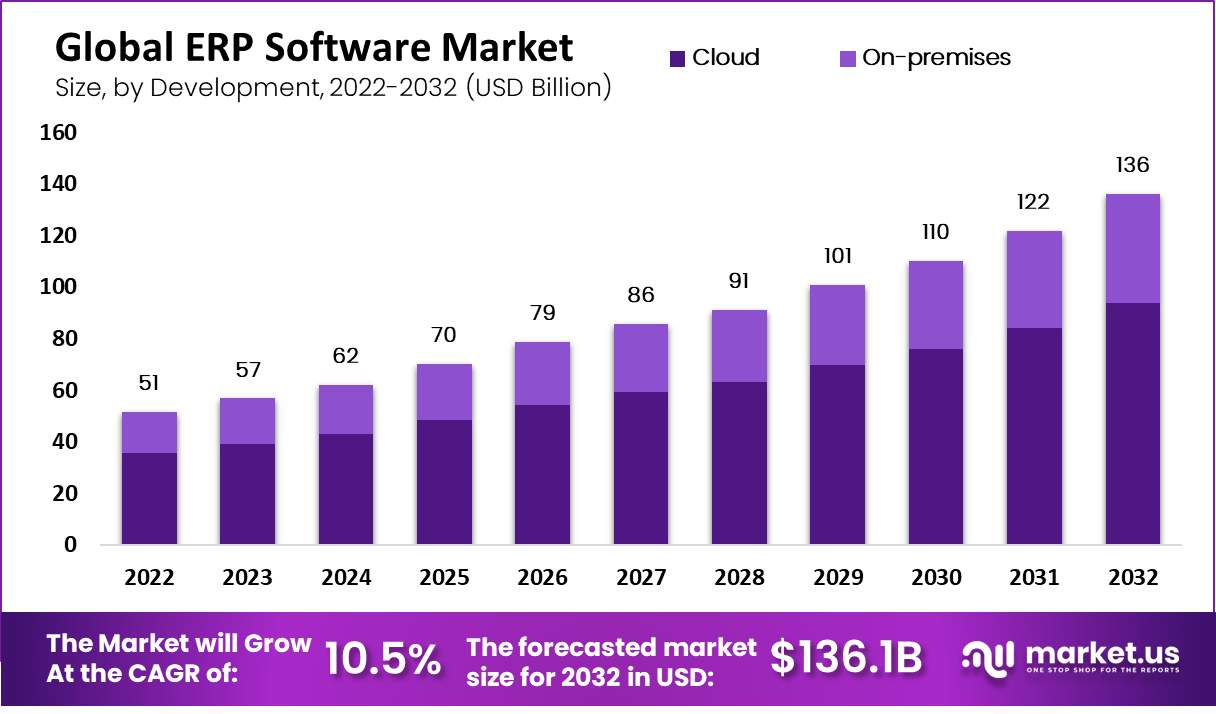
Why Businesses Outgrow Their ERP Systems
ERP systems are the heart of most organizations. They manage accounting, finance, supply chain, human resource, and customer relations. A well-deployed ERP interconnects such processes to provide visibility, reduce redundancies, and enhance decision-making.
However, with time even the finest systems can exhibit signs of wear:
- Business processes change and the ERP does not keep up.
- Integration into newer technologies becomes awkward.
- Employees use workarounds or spreadsheets because the ERP does not have features.
- Reporting becomes unreliable and manual intervention is needed.
At this point, organizations encounter the traditional dilemma of ERP customization versus re-building.
Are they patching their system into a longer life–or are they bold enough to rebuild and take advantage of the modern capabilities of ERP?
Struggling with inaccurate stock and warehouse delays?
Streamline operations with MetaWMS for Dynamics 365 Business Central.
What ERP Customization Really Means
Customization of ERP entails adapting the system to fit the specifications of the business. This may be as minor as inserting custom fields or reports, or as extensive as developing new modules or integrating with third-party software.
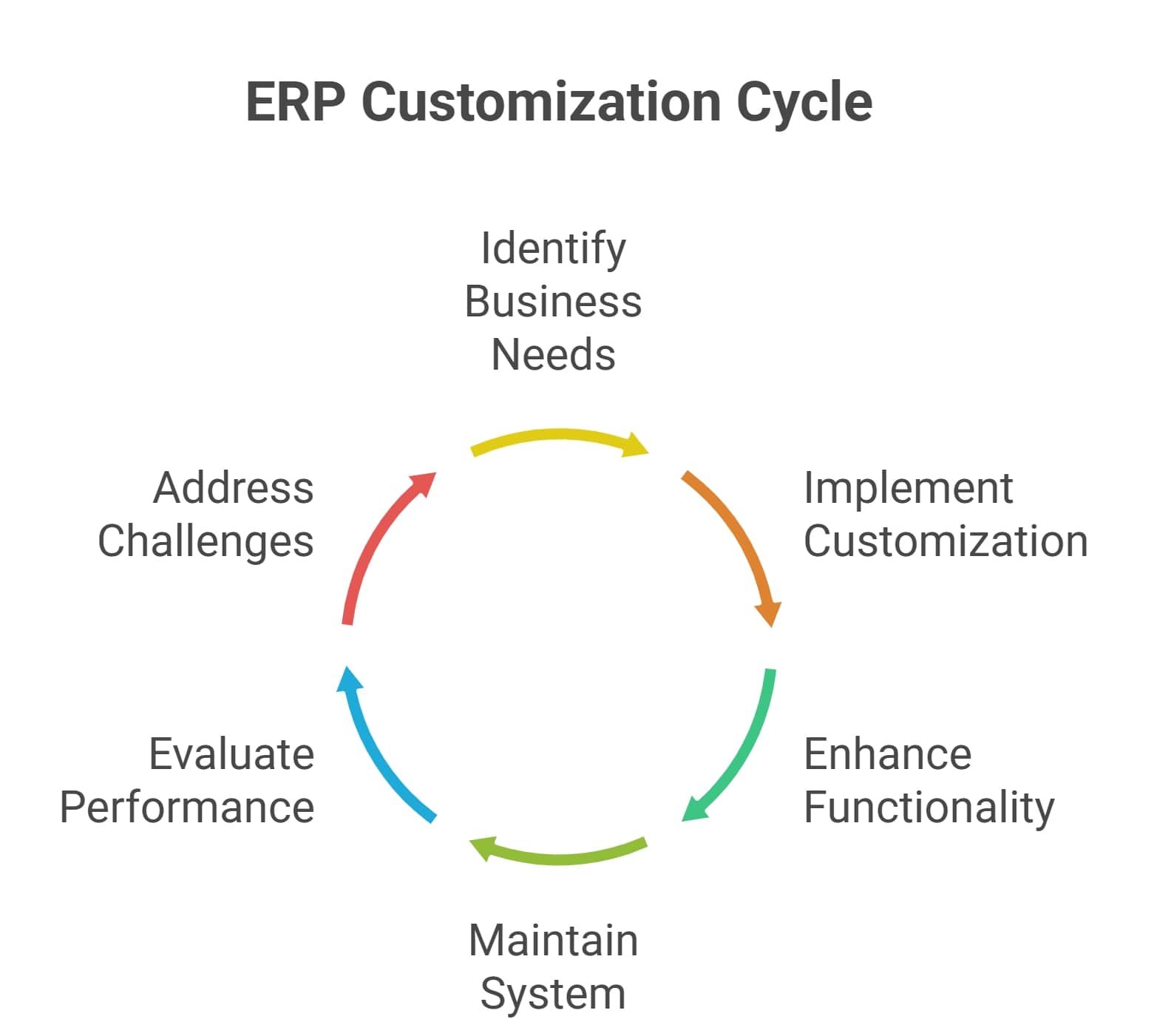
Customization seems like the right option to many businesses. It enables them to maintain current workflows and expand ERP functionality. For example:
- A distribution company may tailor the ERP to monitor special shipping needs.
- A manufacturer may include custom workflows to schedule production.
- A service business may adjust reporting to industry compliance.
The value here is that customization will make the ERP fit the business- and not vice versa. However, it is also not without its problems.
With time, highly customized ERPs may be hard to upgrade, costly to maintain, and hard to change. Once the customizations are more than what the ERP can cater to, businesses find themselves stuck in old systems.
What ERP Rebuilding Really Means
Rebuilding, however, is re-implementing your ERP system, whether on a new platform or by beginning with a new instance of the same ERP tool but without the legacy burden.
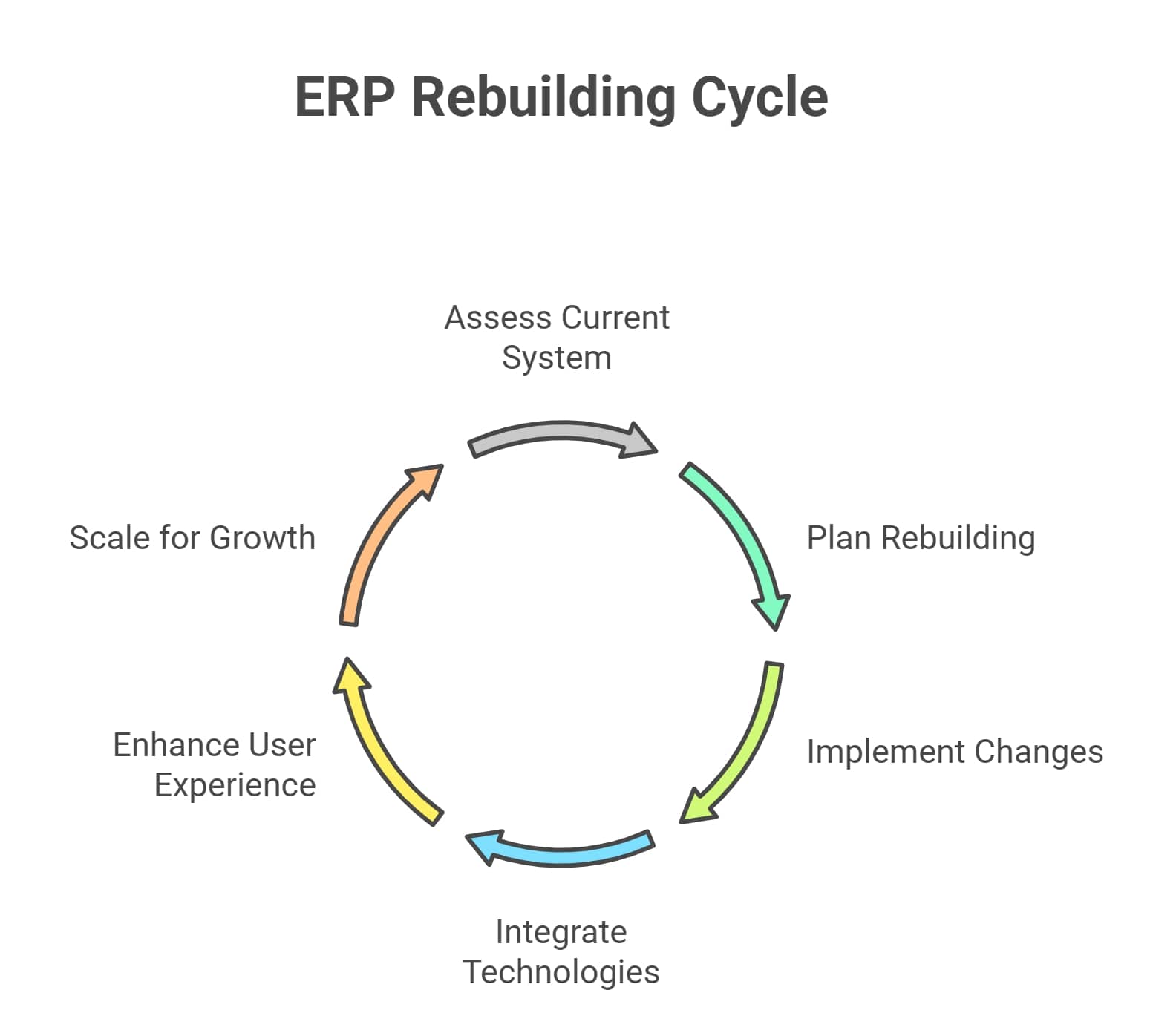
This is a bigger investment but a more transformative one too. Rebuilding enables companies to fit their ERP with current best practices instead of trying to stuff yesterday processes into new software.
The major benefits involve:
- Simpler architecture: Fewer customizations unnecessary, more use of built-in features.
- Scalability: Capacity to sustain business expansion without a performance problem.
- Integration: More convenient integrations with new technologies, such as CRM, e-commerce, analytics, and AI.
- User experience: Contemporary interfaces, mobile accessibility and cloud deployment.
When organizations have years of customizations on top of an obsolete system, rebuilding may seem like demolishing and building a new structure-one that supports the needs of the modern business environment instead of the past.
ERP Customization vs Rebuilding: Key Comparison
The ERP customization vs rebuilding debate is best understood by weighing them side by side.
1. Cost
- Customization: Lower upfront cost, ideal if only small tweaks are needed.
- Rebuilding: Higher upfront cost, but reduces long-term expenses by eliminating inefficiencies and technical debt.
2. Time
- Customization: Faster to deploy, with minimal business disruption.
- Rebuilding: Longer project timelines, requiring careful planning, migration, and training.
3. Scalability
- Customization: Works for limited growth but can eventually hit performance limits.
- Rebuilding: Designed for long-term scalability and future business models.
4. Maintenance & Upgrades
- Customization: Often breaks during vendor updates, creating upgrade nightmares.
- Rebuilding: Cleaner system aligned with vendor-supported features, easier upgrades.
5. Risk
- Customization: Lower short-term risk but higher long-term risk of ERP becoming obsolete.
- Rebuilding: Higher short-term disruption but future-proof in the long run.
Pros and Cons of ERP Customization
Pros
- Cost-effective in the short term
- Quick implementation with little downtime
- Retains employee familiarity with the system
- Meets highly specific process needs
Cons
- Risk of over-customization leading to complexity
- Upgrade difficulties with newer software versions
- Higher long-term maintenance costs
- Limits innovation by locking processes into outdated systems
Pros and Cons of ERP Rebuilding
Pros
- Modern ERP features out-of-the-box
- Improved scalability and integration potential
- Easier upgrades and vendor support
- Long-term cost savings from reduced inefficiencies
Cons
- Higher upfront investment
- Longer implementation period
- Requires training and change management
- Potential for short-term disruption
When to Customize Your ERP
Customization is usually the right choice when:
- Your ERP supports 80–90% of business needs but requires some tailoring.
- You have stable business processes that won’t change drastically in the near future.
- The system is relatively modern but needs extra features.
- Your IT team can manage customizations without compromising upgrades.
- You want to extend the ERP’s lifecycle before making a bigger investment.
When to Rebuild Your ERP
Rebuilding becomes the better choice when:
- The ERP is more than 10 years old and heavily customized.
- Upgrades are painful or nearly impossible due to modifications.
- Integrations with modern tools (CRM, analytics, e-commerce) are missing.
- Employees complain about inefficiency, clunky workflows, or slow performance.
- The ERP vendor is discontinuing support for your version.
- Business strategy requires flexibility, automation, and real-time insights.
At this point, the cost of maintaining and customizing the ERP outweighs the cost of rebuilding.
Facing rising shipping costs and late deliveries?
Simplify logistics with MetaShip, your all-in-one shipping solution.
Real-World Scenarios: Customization vs Rebuilding
To get a clearer picture, we can examine examples.
Examples: Retail Distribution Company
A distributor in a region is overseeing several warehouses. Their ERP is good but with no real time reporting. They instead provide a reporting customization that draws live inventory data instead of redesigning everything. Such customization adds life to the ERP, at the same time addressing an urgent business need.
Example 2: Manufacturing Company
A manufacturer has 15 years of experience of using the same ERP. It is packed with customizations, which makes upgrades impossible. The process of integrating automation tools is costly to work around. Having considered them, they decide to rebuild using a modern system that incorporates Warehouse Management Solution and that allows them to eliminate unnecessary customizations. This reconstruction increases efficiency and reduces long-term expenses.
Example 3: Logistics Company
A logistics company has an out of date ERP that is not connected to carriers and does not do real time tracking. Customizations are not the solution to the problem without breaking upgrades. It is more sensible to rebuild with a new ERP that has a Shipping Management Solution to ensure scalability and visibility to the customer.
The Role of Modern ERP Platforms
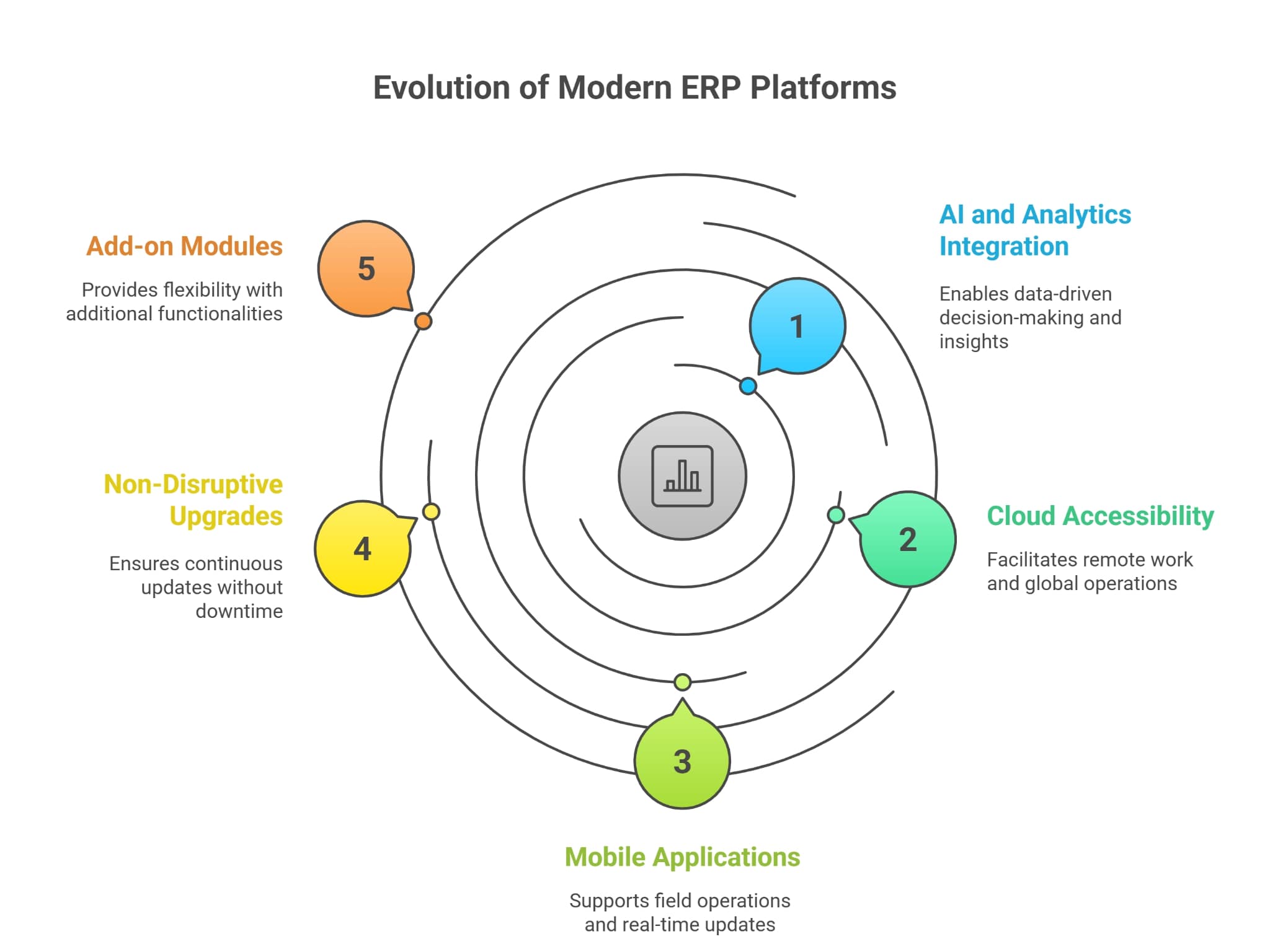
The ERP systems have changed a lot over the past ten years. The rigid, complex platforms that once demanded a lot of customization are now much more flexible, cloud-ready, and feature rich out of the box. Contemporary solutions are not only meant to manage data but also to enable businesses to gain insights, automate and scale.
A notable example is Dynamics 365 Business Central Services, which has the capabilities of an enterprise software with the cost-effectiveness and flexibility of a cloud-based application. Business Central is preconfigured with features that do not require extensive customization to fit specific business requirements, unlike other older systems that required extensive customizations. This mitigates risk and makes organizations compatible with features that are supported by vendors.
Modern ERP platforms now provide:
- AI and analytics integration out-of-the-box
Modern ERPs are not mere containers of information, but sources of intelligence. The integrated analytics and AI capabilities enable companies to make demand forecasts, detect bottlenecks and even predict customer behavior. This implies that decision-making is quicker, more intelligent, and based on real-time data rather than guesswork.
- Remote working via cloud accessibility
The trend of distributed workforces has made cloud deployment a necessity. Contemporary ERPs enable teams to access systems at any time in any place without the costly on-premise infrastructure. This versatility facilitates remote processing, international supply chains, and workforces on the move.
- Field employee mobile applications
Field service workers, warehouse employees and sales reps can now work with ERP data when on the move. Mobile ERP applications make it faster to check stock, make sales quotations, and update order statuses.
- Non-disruptive upgrades
The time of months of planning and expensive consulting fees are gone when it comes to ERP upgrades. Cloud-based ERPs provide automatic, hassle-free upgrades, so businesses are always up to date with the latest features without any downtime.
Besides this, other add-on modules such as Shipping Management Solution or Warehouse Management Solution can be easily incorporated in these platforms with little effort. Businesses can no longer settle on having heavy customizations or having systems that are not connected to each other. This renders the concept of rebuilding using a modern ERP much more appealing than it was 10 or 15 years ago when custom development was frequently the only choice.
Is your ERP too rigid to support growth?
Scale smarter with Microsoft Dynamics 365 Business Central.
Common Mistakes to Avoid
The decision to either customize or rebuild an ERP is complicated enough, but most organizations make simple errors that cost them more time and money. Being aware of these pitfalls can help you avoid costly mistakes.
- Over-customizing
Most companies are approaching their ERP as clay that can be shaped to meet every whim. Although customization can enhance workflow alignment, excessive customization causes technical debt and makes upgrades virtually impossible. Before creating custom code, companies should look at standard ERP functionality and see whether with some minor modifications, it can address their needs.
- Disregarding long-term expenses
The initial cost of customization can be tempting, but the actual cost can be felt later in the maintenance and upgrades, and in the inefficiency. When making the decision between ERP customization and rebuilding, businesses should consider the total cost of ownership (TCO) over five to ten years rather than the short-term price difference.
- Underestimation of training needs
Even when the rebuild of the ERP is the best, failure might still occur without proper training of employees. Adoption depends on change management. Lack of effective onboarding means staff fall back on legacy processes or create workarounds, which erodes the potential of the ERP. It is imperative to invest in structured training and support.
- Not engaging with Qs
IT teams should never make ERP decisions in a vacuum. The input should be on the part of operations managers, finance leaders, warehouse supervisors, and even frontline employees. Ignoring stakeholder involvement can lead to solutions that do not solve real-world problems, making them less likely to be adopted and deliver ROI.
- Delaying decisions
Other organizations are unable to move on to more modern ERPs due to sunk costs or fear of disruption. However, postponing the unavoidable is a potentially more damaging practice The longer the delay, the more inefficient operations, missed opportunities, and competitive disadvantages accrue. The sooner, the better, to keep your ERP system a driver of growth, not a restraining force.
With these pitfalls in mind, businesses will be in a stronger position to make a decision between ERP customization and rebuilding with a greater sense of confidence in the outcome and a clearer view of how the decision will support both short-term and long-term strategy.
Final Thoughts
ERP customization or rebuilding is one of the most important technology decisions that businesses make. Customization is effective when your ERP is not so old and just needs adjustments. Rebuilding is a logical option when your ERP is obsolete, over-customized, or incapable of supporting future growth.
The appropriate decision is a trade-off between cost, scalability, vendor support, and business strategy. With a thoughtful assessment of your ERP and a modeled approach, it will be possible to select the path that will put your company on the right course toward the future.
The end game is always the same, whether you customize or rebuild, to achieve a flexible, efficient and future proof ERP system that can enable your business to scale, adapt and thrive.

